Find This: Turn a Product Photo Into a Place to Buy It


Download for iPhone: visual product search app
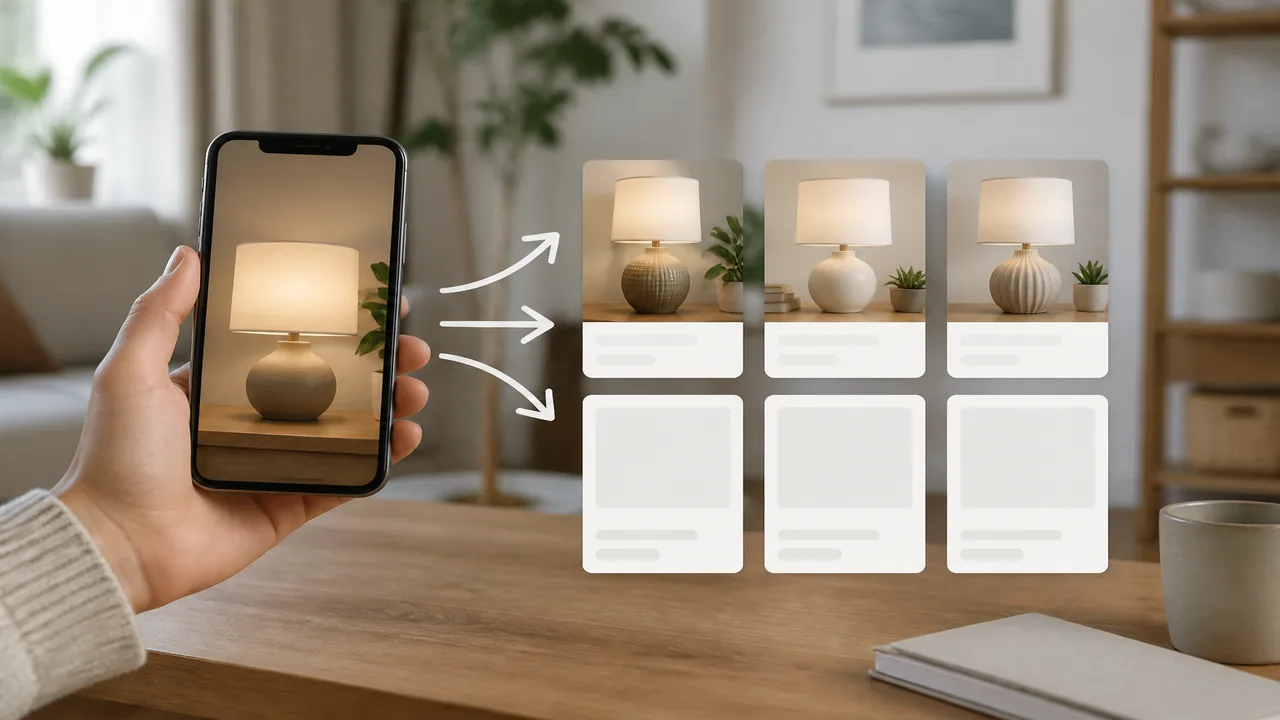
When your whole query is “find this,” the photo supplies the missing words. Upload the image, isolate the item, identify the strongest match, and only then look for a trustworthy place to buy the exact version or a suitable alternative.
> The short route is photo → identity → verification → store—not photo → first checkout button.
- Crop to one item and preserve its distinctive details.
- Confirm the product before comparing listings.
- Check variant, stock, shipping, returns, and seller trust.
I want to find this—what do I do?
- Save the clearest photo or screenshot you have.
- Crop around the product, leaving logos, labels, shape, and important accessories visible.
- Run a product-focused visual search and review exact-looking matches.
- Compare model numbers, dimensions, material, color, pattern, and included pieces.
- Open verified store pages and compare the total offer.
find this item app when you want to move directly from an image to likely product matches and store comparisons. Invy is a shop-by-image app for identifying products from photos and comparing prices; it does not make every similar-looking result exact.
First identify this item
Do not begin with price if you do not yet know what the object is. A low price for the wrong model is not a deal. Look for a brand mark, product line, model field, recognizable shape, unique hardware, packaging, pattern, or connector arrangement. Search close-ups separately when the full photo is busy.
The complete method is in find product by picture. That guide explains image quality, exact versus similar matching, and verification across categories. Use it when “find this” needs a deeper product-search workflow.
Decide what “this” means
| Your actual goal | Required match | What to verify |
|---|---|---|
| The identical product | Exact brand, model, and variant | SKU, dimensions, color, edition, accessories |
| The same look | Similar shape, material, and style | Quality, measurements, finish, reviews |
| A compatible replacement | Technical compatibility | Part number, fit, voltage, size, manufacturer guidance |
| A cheaper alternative | Required features at a lower total cost | Specifications, warranty, shipping, returns |
Say which version you need. “Find this exact lamp” calls for model verification; “find this style of lamp” allows visual alternatives. Compatibility searches require specifications, not visual resemblance alone.
Then find where to buy this product
After identification, switch from image similarity to listing verification. Follow where to buy this product for the store-selection step. Compare official retailers, established stores, and reputable marketplaces. Confirm that each listing is for the same item rather than a mini version, refill, accessory, older generation, or different bundle.
The total price includes shipping, taxes, membership requirements, warranties, and return costs. A marketplace thumbnail may reuse an official product image even when the seller’s actual item differs, so read the listing and seller information.
Make the “find this item” photo work harder
- Use a straight, sharp angle with the whole product visible.
- Retake glossy products in diffuse light to avoid blown-out labels.
- Search a clean close-up of branding or model text as a second query.
- For clothing, isolate one garment rather than the entire outfit.
- For furniture, include legs, joints, hardware, and a sense of scale.
- For electronics, include the rear label, ports, controls, and accessories.
If the screenshot is tiny, look for the original post or video frame before enlarging it. Upscaling can make an image look smoother but cannot recreate reliable model text.
If no exact match appears
Try another crop, angle, or search service. Add verified text terms to the image-derived category. Search archived and resale listings if the item may be discontinued. If you only care about appearance, keep the two or three defining traits and relax the brand requirement.
Do not let urgency lower verification standards. Fake stores often borrow product photography and advertise implausible discounts. Check the domain, contact details, payment protections, return policy, and independent reputation before entering payment information.
Understanding Results
A convincing match shares
- Brand and model evidence
- Shape and construction details
- Correct dimensions and variant
- Consistent product specifications
Pause before buying when
- The price is implausibly low
- The seller uses copied images only
- Model or variant details conflict
- Returns and contact details are unclear
Make a match card before opening store results
Turn the strongest identification into a short checklist that follows you across listings. Record the likely brand, exact model or style name, variant, color, size, material, dimensions, distinctive construction, and included accessories. Copy model numbers exactly, including spaces, suffixes, and regional codes. This “match card” prevents a polished listing title from quietly changing what you are looking for.
Use the photo and an authoritative source to fill the card. A manufacturer page, manual, catalog entry, or reliable archived listing is stronger than repeated marketplace titles. Mark every uncertain field rather than guessing. For a compatible replacement, include the interface, capacity, voltage, measurements, and approved parent models; appearance is secondary. For fashion or decor, prioritize measurements and visible finish because retailers often use broad style names inconsistently.
Reject candidates with an unexplained conflict. A different port position, missing seam, changed cap shape, wrong package quantity, or incompatible dimension may identify a related model rather than “this” item. If no candidate satisfies all critical fields, keep the result at family level and search for more evidence.
Evaluate the seller and listing after the item matches
Identification and seller evaluation are separate decisions. Confirm the listing’s model field, variant selector, package contents, condition, stock status, delivery region, and return window. Product pages sometimes combine reviews and photos from several variants, so make sure the selected option—not the page headline—matches your card. For used goods, request current photos of the actual item when the seller only shows catalog imagery.
| Listing check | Good evidence | Reason to pause |
|---|---|---|
| Seller identity | Verifiable business details and consistent history | New domain, copied contact text, no accountable seller |
| Product identity | Exact model, variant, specifications, and contents | Generic title or contradictory photos |
| Transaction terms | Clear total, delivery, warranty, and returns | Hidden charges or irreversible payment request |
| Availability | Current stock and realistic dispatch estimate | Universal scarcity claims or perpetual countdown |
Save the listing details and receipt at checkout because pages can change. If the exact item is discontinued, decide explicitly whether you will wait, buy used, or accept an alternative. Do not let a visually similar substitute inherit compatibility, safety, or performance claims from the original product.
FAQ
Can I just upload a photo and say find this?
Yes. A visual product search can use the image as the query, identify likely products, and surface exact or similar listings without requiring the product name first.
How do I find this exact item?
Use the clearest image, crop around one product, include labels or logos, then verify model, size, color, material, and distinctive details across candidate listings.
Can a screenshot work?
Yes. Screenshots often work when the item is large and sharp. Crop captions and interface clutter without removing product details.
What if the exact item is sold out?
Search the model name across retailers and resale sources, set alerts if available, or compare similar products that preserve the features you care about.
How do I know where to buy the match?
Open the retailer page and verify seller identity, stock, shipping, returns, model, variant, and total price before checkout.
Does Invy compare prices after finding the item?
Invy is built to identify products from photos and compare connected store listings. Coverage varies, so confirm the current offer on each seller page.
Why did the search find a similar item instead?
The photo may hide identifying features, the exact product may be absent from indexed catalogs, or a generic design may be shared by many brands.