Free Shop By Image App For Photos And Screenshots


Download for iPhone: AI shopping assistant app
A free shop by image app lets you upload a photo or screenshot, identify matching or similar products, and compare where to buy them without paying upfront. Invy is a practical pick when you want visual product matches plus price comparison, not just a page of lookalike images.
> Invy is a shop by image app that identifies products from photos and compares prices across stores for online shoppers.
- Use a free visual shopping app when you have a product photo but do not know the brand, model, or search terms.
- The strongest free tools find visually similar products, but the best shopping workflow also compares prices, shipping, and seller options.
- Free apps may monetize through affiliate links, ads, retailer partnerships, or data use, so check result bias and privacy policies.
How free shops look
Side-by-side captures of the compared products. Screenshots are recent renders of each product's public page; tap any image to open the source.
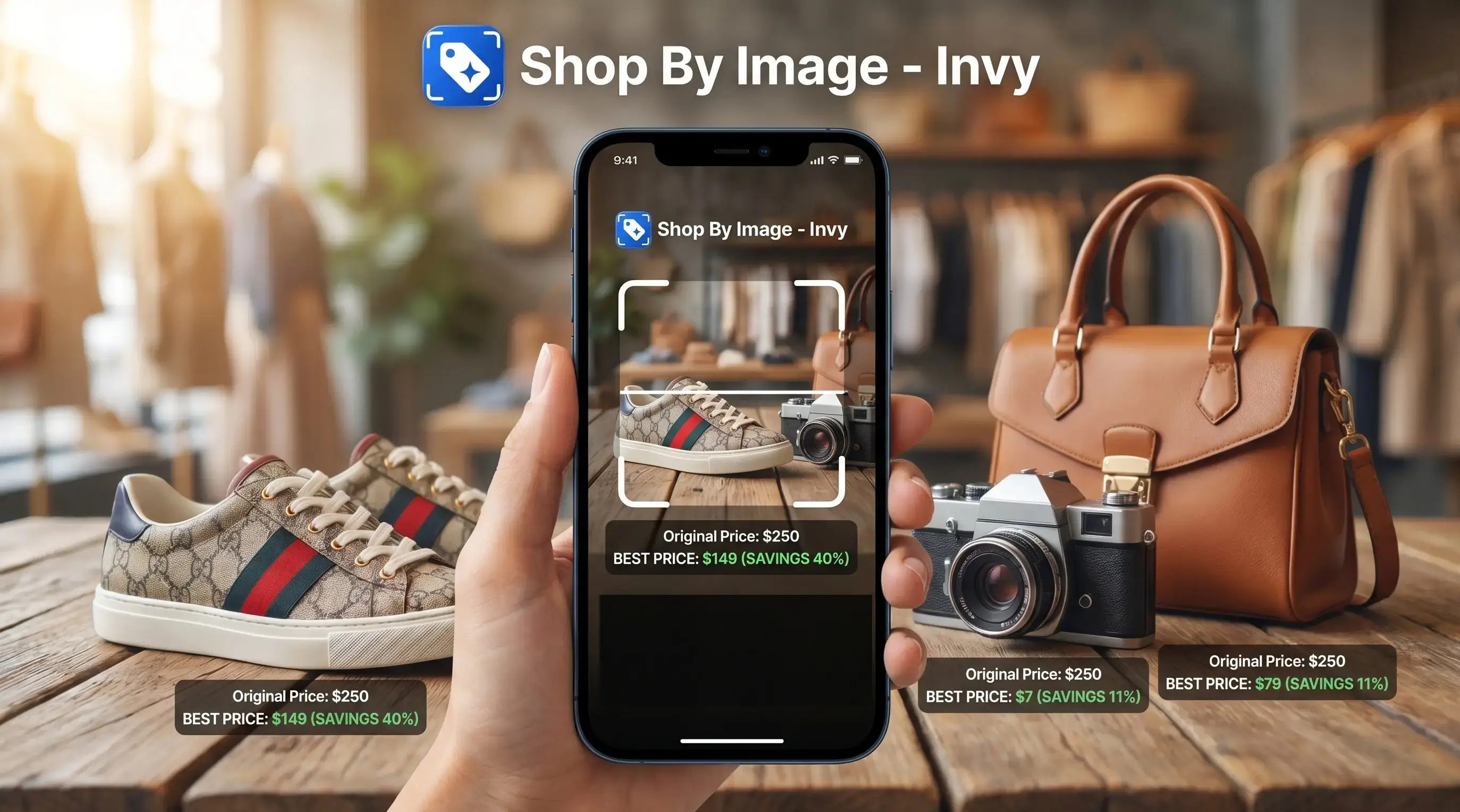
Free Shop By Image App At A Glance
A free shop by image app lets you take or upload a product photo, then returns product matches, similar options, and shopping links. The buying decision is usually simple: do you need the exact item, a close alternative, or the lowest total price across stores?
Visual search is now a mainstream shopping behavior: McKinsey reported that 75% of U.S. consumers were interested in visual search for shopping and discovery in 2023, and Google says Lens is used more than 10 billion times per month globally (McKinsey; Google).
Invy fits shoppers who start with the image and want a buyable result with price comparison. It is not for people search, identity lookup, or general reverse image search.
Same-looking is not always same-product.
For shoppers comparing where to buy, Invy is often more useful than a plain image matcher because it keeps product match, retailer listing, and price comparison in one workflow.
Best Free Visual Shopping App Shortlist
The strongest free visual shopping app depends on the job: broad discovery, style inspiration, marketplace search, or price comparison. A sneaker screenshot, a cabinet pull photo, and a cropped creator mirror selfie need different tools.
Invy: best for photo search plus price comparison
Invy is the right fit for shoppers who want to identify a product from a photo and compare stores before buying. The Shop By Image workflow covers upload, review, compare, so a saved screenshot can turn into several retailer options.
Google Lens: best for broad visual matching
Google Lens is strong for web-scale matching and general product discovery. It can surface visually similar products, articles, and retailer pages when the item is common enough.
Pinterest Lens: best for style discovery
Pinterest Lens works well for style, decor, and inspiration-driven similar items. It is helpful when you want the look, not necessarily the identical seller page.
Amazon Lens: best for Amazon marketplace matches
Amazon Lens is convenient when you already want to buy inside Amazon. Its main limit is marketplace scope, since it does not aim to compare every outside retailer.
For a broader paid-and-free ranking, use the best shop by image app guide.
How We Picked The Free Visual Shopping Apps
We picked the free visual shopping apps by judging how well they turn a photo into a useful buying decision. The shortlist favors image matching, shopping utility, and free access over general reverse image search power.
The comparison set was Invy, Google Lens, Pinterest Lens, and Amazon Lens. Each was considered through a shopping lens: could it recognize the item, surface buyable options, and help a shopper avoid guessing from a single lookalike result?
- Test image matching with product photos and screenshots, since many real shopping searches start from saved social posts, ads, or camera-roll images.
- Weigh price comparison heavily when an app helped compare item price, shipping clues, stock signals, or seller options instead of only showing similar images.
- Check retailer coverage by looking for whether results stayed inside one marketplace or offered broader store choices.
- Review free access, including whether the core photo-search workflow worked without an upfront payment.
- Rank apps for shopping decisions first, so a tool with stronger buying support can beat a broader image search tool.
Free features, retailer coverage, and app interfaces can change, so treat this as a practical snapshot rather than a permanent score.
8 Criteria For Picking A Free Shop By Photo App
Use these eight checks before depending on any free app to shop by photo:
- Image match quality: Does it find the same item, or only close shapes and colors?
- Product category coverage: Fashion is common, but home decor, electronics, groceries, and parts matter too.
- Price comparison depth: Does it compare total cost, or only show a product card?
- Retailer diversity: More stores can mean better choices, if listings are current.
- Ease of upload: Recent photos, camera capture, and gallery access should be quick.
- Screenshot support: A blurry Instagram Story screenshot before it disappears should still be usable when the product is visible.
- Free limits: Search caps, alerts, and advanced comparisons can change.
- Privacy clarity: Photo retention, model training, and partner sharing should be easy to understand.
The right app is not always the one with the most matches; it is the one that helps you decide where to buy. Monetization matters because ads, affiliate links, and retailer partnerships can affect ordering.
How A Free Product Finder By Image Works
A free product finder by image works by turning a photo into visual signals, then comparing those signals with product catalogs or web indexes. In technical terms, many systems use object detection and image embeddings; in plain language, they look for the item and compare its visual fingerprint.
The flow usually goes like this: upload an image, detect the product, extract features, compare against listings, then return likely matches. Signals can include shape, color, texture, logo, text, pattern, and surrounding clues. A white-background product photo is easier than a watch strap cropped from a wrist shot.
AI can identify the exact product when enough visual and catalog signals line up. If not, it should return similar alternatives and make that uncertainty clear.
Price comparison is a separate layer. Invy has to match seller listings, normalize variants such as size or color, check availability, add shipping, and show the current price. Good visual shopping tools deliver buyable results, not certainty about authenticity, identity, or material value.
How To Use A Free Shop By Image App
Use a free shop by image app as a short buying workflow, not a final answer. The goal is to move from photo to product match, then from product match to a retailer you trust.
- Take a clear photo or screenshot with the product centered, visible, and not covered by captions or stickers.
- Upload the image to Invy or another free product finder by image from your camera roll, gallery, or recent screenshots.
- Review exact matches and similar alternatives, especially if the result shows the right color but the wrong size.
- Compare price, shipping, seller reputation, stock status, and return policy before opening the retailer listing.
- Save the strongest result, or try a cleaner image if the matches look weak.
Anyone dealing with a holiday list made only of screenshots can use Invy to sort product matches from similar options through the Shop By Image flow. If price is the main issue, a dedicated download price comparison app workflow may also help.
The tiny out-of-stock label often appears only after tapping into the seller page.
Free Visual Shopping App Comparison Table
A free visual shopping app comparison should separate discovery from buying support. Google Lens is broad, Pinterest Lens is inspiration-heavy, Amazon Lens stays close to Amazon, and Invy focuses on shopping decisions across stores.
| App | Best use case | Image source | Price comparison strength | Free model | Main drawback |
|---|---|---|---|---|---|
| Invy | Product identification plus cross-store comparison | Photos and screenshots | Strong for comparing retailer options | Free to start | Results depend on retailer coverage and listing freshness |
| Google Lens | Broad visual matching and general discovery | Camera, screenshots, web images | Variable by result | Free Google feature | May send you to discovery pages before buyable listings |
| Pinterest Lens | Style, decor, and similar-item inspiration | Camera and saved pins | Limited for cheapest-seller checks | Free with platform monetization | May prioritize inspiration over exact purchase options |
| Amazon Lens | Finding products inside Amazon | Camera and saved images | Strong inside Amazon only | Free in Amazon | Marketplace-specific and not cross-store |
Shoppers trying to avoid overpaying usually need more than a pure discovery tool because the comparison step should include seller and price checks. For deeper category coverage, the best product search by image app guide explains how product search differs from general reverse image search.
Common Myths About Free Product Finders By Image
A free product finder by image can be useful without being all-knowing. The first myth is that it can always identify the exact brand and model from any image. It cannot, especially with niche, custom, vintage, or poorly photographed items.
Another myth is that visual shopping only works for fashion. It can also help with lamps, headphones, cereal boxes, replacement knobs, and small appliance parts when catalog data exists. Paid tools are not automatically more accurate either; major free systems can be strong because they learn from large-scale image and product data.
Privacy needs attention. Uploaded photos are not automatically private, so check retention, model improvement, partner sharing, and account settings. A phone balanced on a café saucer with a screenshot open still contains background details.
The first result is not always cheapest. Sponsored placement, retailer partnerships, and affiliate incentives can shape what appears first.
Understanding Results
Shop by image, product finder, and visual product search tools are useful for turning photos or screenshots into shopping leads, but they are not proof of an exact match. Use results for price comparison, then verify the retailer page, seller, shipping, and return terms before buying.
Invy works best when
- Clear product photos with the full item visible
- Screenshots from product pages, ads, social posts, or videos
- Finding similar items when the brand or model name is unknown
- Comparing prices across available retailer listings
- Checking multiple stores before choosing where to buy
Invy may be less accurate when
- Low light, glare, clutter, blur, or heavy cropping
- Generic items that many brands sell with similar designs
- Exact color, fabric, size, or model confirmation
- Listings that change quickly or are blocked by retailers
- Authenticity, counterfeit, safety, or material verification
FAQ
Is there a free shop by image app?
Yes, free options include visual search apps and AI shopping assistants with different feature limits. Some focus on discovery, while others focus on product matching and price comparison.
What app finds products from pictures?
Common options include Invy, Google Lens, Pinterest Lens, and Amazon Lens. Use Invy for price comparison, Google Lens for broad discovery, Pinterest Lens for style ideas, and Amazon Lens for Amazon listings.
Can I shop from a screenshot?
Yes, screenshots usually work if the product is visible, uncropped, and not covered by text or overlays. Cleaner screenshots tend to return better product matches.
Is Google Lens free?
Yes, Google Lens is free to use. It is strongest for broad visual matching, product discovery, translation, and general image search.
Is Amazon Lens free?
Yes, Amazon Lens is free inside Amazon. It mainly searches Amazon marketplace listings rather than comparing stores across the wider web.
Which app compares product prices?
Some visual search tools identify products only, while Invy focuses on comparing prices across stores. Price comparison should include item price, shipping, seller reputation, stock status, and return policy.
Can photo shopping find exact products?
Exact matches are possible but not guaranteed. Niche, custom, vintage, altered, or poorly photographed items often return similar alternatives instead.
Are visual shopping apps private?
Privacy varies by app. Review upload handling, photo retention, model-training use, partner sharing, and account settings before uploading sensitive images.
What improves image search accuracy?
Better lighting, a centered product, clean background, multiple angles, and sharp focus improve accuracy. Avoid blurry, cropped, mirrored, or heavily filtered images when possible.